
How to use the TV Guide
See what’s on now and next on every channel, and watch, record or set a reminder from a programme.
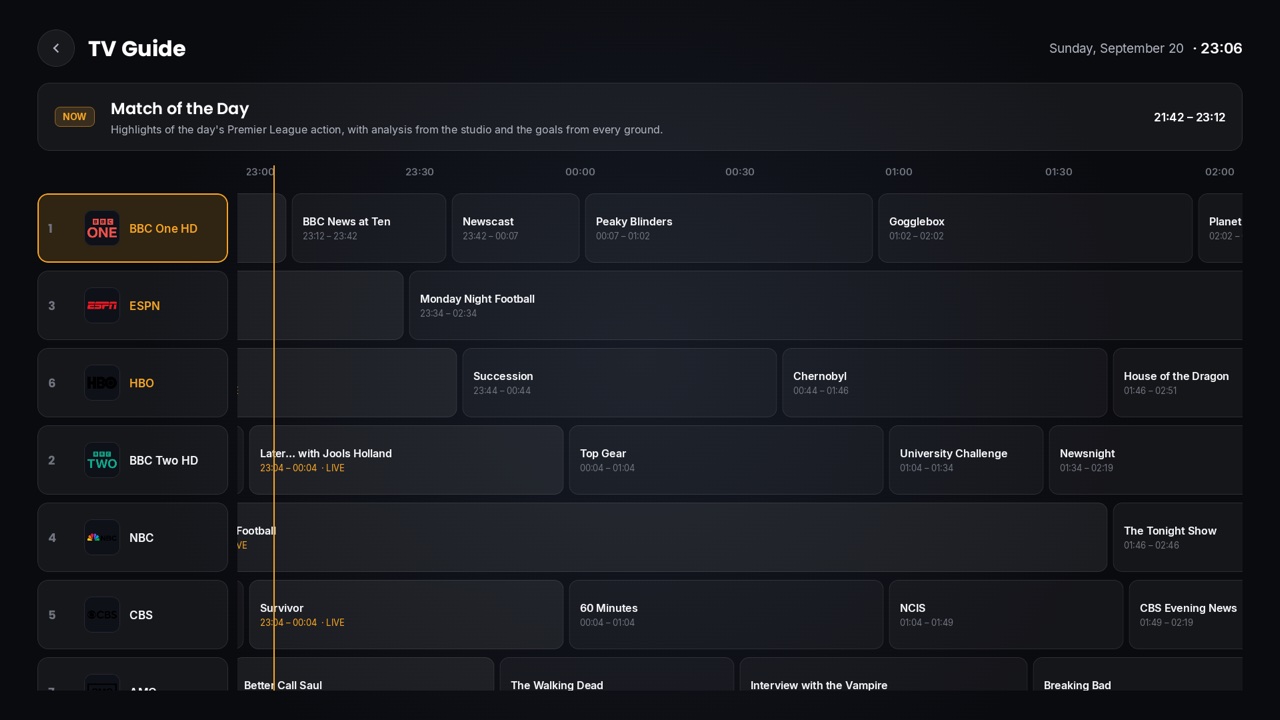
Step by step
- 1
Open the TV Guide
On Home, go down to the bottom row and press OK on “TV Guide”. Your favourite channels come first (with a gold name), then every channel that has a programme guide.
- 2
Move around
▲ ▼ move one channel; CH+ / CH− jump 6 channels at a time. Press ▶ or OK on a channel to step into its programmes, starting at the one on now; ◀ ▶ then move through time.
- 3
Watch what’s on now
Press OK on a programme that is live and choose “Watch now”. In the player, ▲ ▼ then follow the guide’s channel order.
- 4
Record or remind
On a live programme choose “Record now”. On a later one choose “Set reminder” or “Schedule recording”. A 🔔 appears on programmes with a reminder.
- 5
Leave
BACK closes the options, then returns to the channel column, then leaves the guide.
Tips & tricks
- The guide shows from about half an hour ago to tomorrow.
- Settings › EPG / TV Guide sets how often the guide refreshes, and has “Refresh guide now”.
- While watching a channel, press ▶ for that channel’s schedule without opening the full guide.
If something goes wrong
- ⚠A channel shows no programmes: your provider has no guide for it. Try Settings › EPG / TV Guide › “Refresh guide now”.
- ⚠The guide uses your first active playlist when you have several.
Related guides
Reminder: 1ClickTV Player is a media player — bring your own authorized IPTV playlist or provider.